If SolidWorks user found out that the edit material option is missing in their SolidWorks part, it is a common known bug.
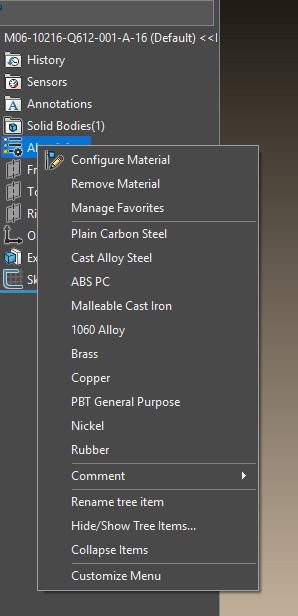
The user can solve this issue by resetting SolidWorks Windows registry by following the steps below:
- Close all instances of SOLIDWORKS
- Launch the Windows Registry Editor. (Go to the Start menu and type: regedit)
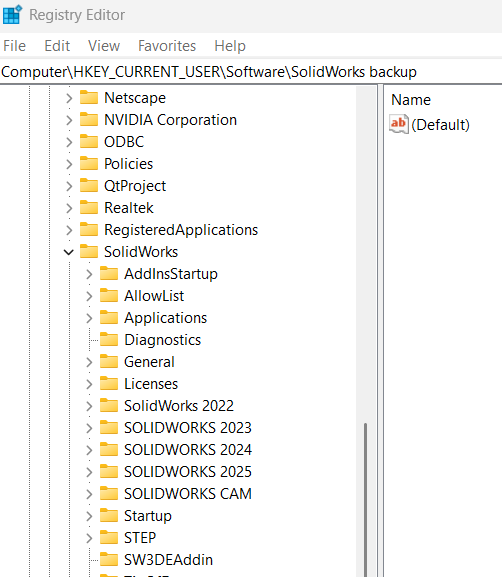
- In the Registry Editor expand HKEY_CURRENT_USER\Software\SolidWorks
- Expand the SolidWorks folder. This folder contains multiple folders that control different aspects of SOLIDWORKS on your machine. There are separate folders listed here for each different version of SOLIDWORKS that is installed on the machine. In the image below you may see that I have multiple versions (2023, 2024, and 2025).

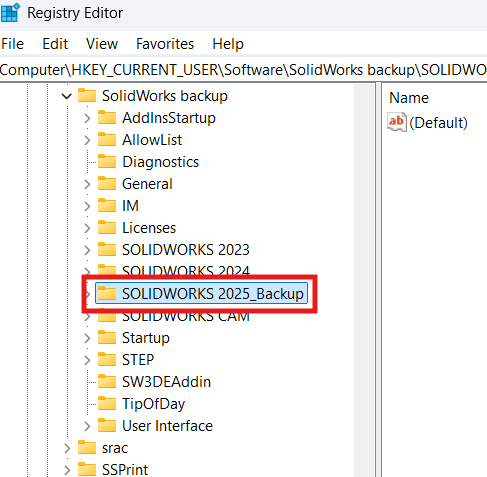
- It is always advisable not to make permanent changes to the registry without first checking that they will not damage your system. As such, at this point you can right-click the folder that represents the version of SOLIDWORKS that you want to reset (in this case 2025), and select to Rename the folder.
- Rename the entry something like SOLIDWORKS 2025_Backup
- Try open back SolidWorks and check those issue.