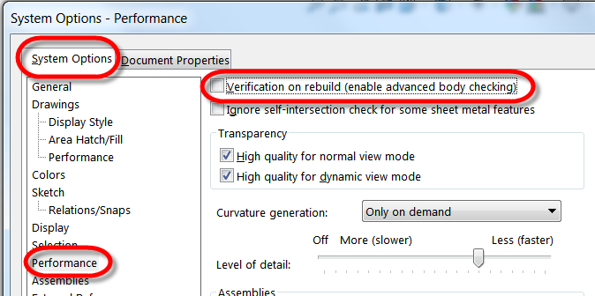
An option that checks the topological accuracy of part bodies during the rebuild process. It evaluates new or modified features against all faces and edges in the model, not just the adjacent ones.
Impact on Performance:
- Enabled: Slower rebuild times (up to 35% slower) due to additional checks on all faces and edges.
- Disabled (default): Faster rebuilds, checking only adjacent faces and edges, which is typically sufficient for most models.
When to Use:
- Use when working with complex surfaces or sheet metal models to ensure thorough error checking and to catch rebuild issues that may not be found with the default checks.
- Disable after rebuild: Enabling this option for regular work can slow performance, so it’s best to turn it off once the rebuild is complete.
How to Enable/Disable:
- Go to Tools > Options.
- In the System Options tab, select Performance.
- Check or uncheck Verification on rebuild to enable or disable the feature.
For most models, the default rebuild check (adjacent faces and edges) is sufficient and provides faster performance. Only enable Verification on Rebuild for complex models where additional checks are necessary.